Shops, showrooms and studios
A Mac mini behind a window display, a showroom wall or a reception screen, run from the iPhone in your pocket.
Coming soon
A Mac mini plays your screens, and you run them from the Studio app on your Mac, iPhone or iPad. No Windows PC, no Android box: one native player for macOS, one app to manage it, and easyCMS Studio on the web for everything else.
The Mac player is waiting for Apple’s signing and the Studio app for the App Store. Sign up for product news to hear when they are released.
If your team works on Macs and iPhones, your signage can too, set up and looked after like the rest of your Apple devices.
A Mac mini behind a window display, a showroom wall or a reception screen, run from the iPhone in your pocket.
Make and change designs on your Mac, play them on your clients’ screens, and check what each one shows from anywhere.
One more Mac in the fleet rather than a new kind of device: macOS updates, your usual management tools, and a player that looks after itself.
Everything signs in to the same easyCMS account, so a change in the app on your iPhone shows on the screen within seconds.
A native app for Apple silicon and Intel Macs. It opens full screen, starts at login, restarts itself after a crash, updates from easyCMS and plays offline. It pairs with a code on the screen.
Waiting for Apple’s signing
Your screens, online or not and what each one plays; ready-made designs to edit; photos and videos; play a design always, between two dates or on repeat. Everything it does is easyCMS Studio, so it always matches the web.
Coming to the App Store
Menus and prices, meeting rooms, exchange rates, analytics, plan and licences: all of Studio, in any browser, with the same account. The app opens these pages for you, already signed in.
Internet down? The Mac mini plays on from the files it has saved, and picks up your changes when it is back online.
Pick a device to see what it does in easyCMS. Everything shown is our real interface.
Under or behind the screen, the easyCMS player for Mac opens full screen and plays what you schedule. Pick a design to see it on the screen.


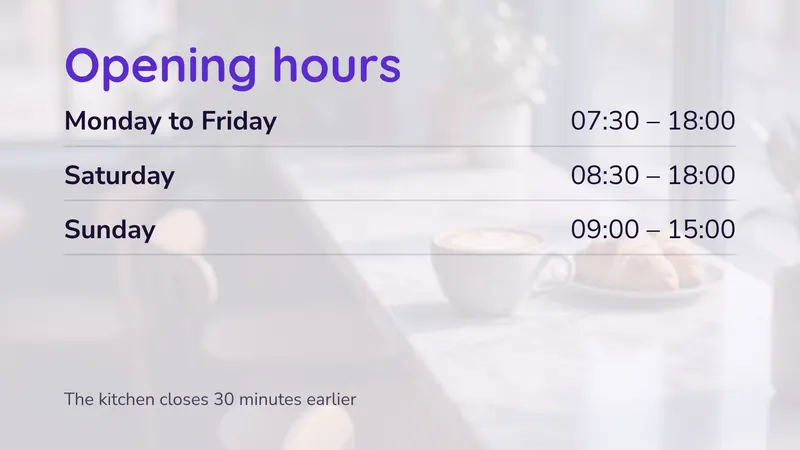

A Mac mini under the screen, playing one of the designs we ship
On a MacBook or an iMac, Studio gives you room to work: the words, colours, heading font and photo of a design, with a live preview as you go.

The Studio app on a Mac: a design’s style, with its live preview
Walk the floor with an iPad: see what each screen plays, play another design on it, or stop one, in a tap.

The Studio app on an iPad: one screen, what it plays and when
Sold out of the soup? Change the special from your pocket. Studio on your iPhone shows which screens are online and lets you change what they play.

The Studio app on an iPhone: a screen and what it plays
On any computer or phone, Studio on the web has all of it: your screens, menus and prices, schedules, analytics, plan and licences. The same account as the app.
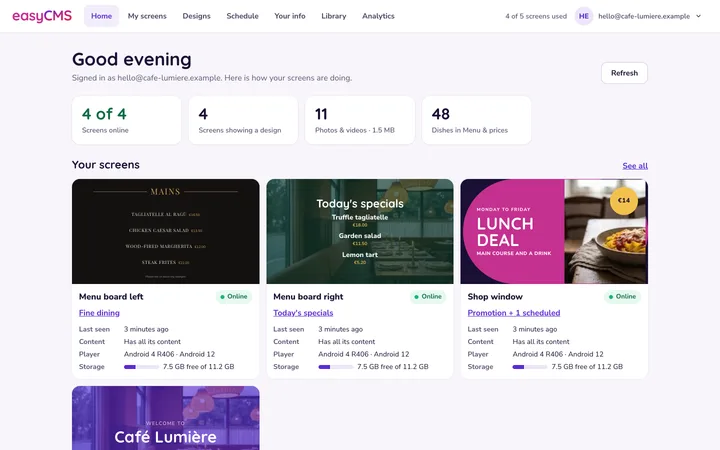
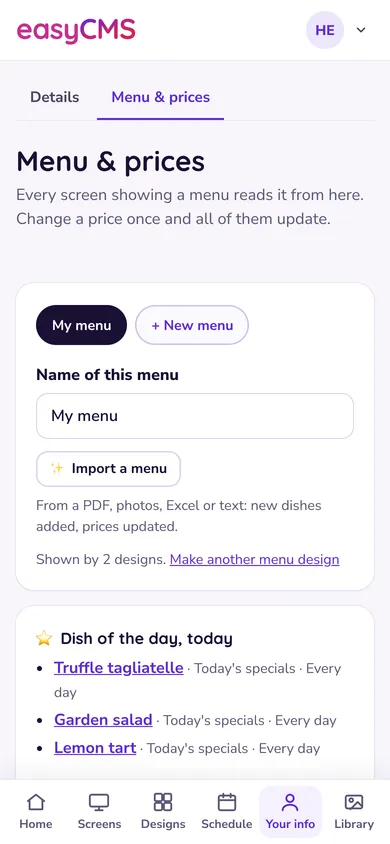
Studio on the web, on a computer and on a phone’s browser
Tap a price on the phone and watch the screen change, as your screens do when you change a price in Studio.
A demo on this page: nothing is sent anywhere.
Menus & prices
Tap a price to change it
Pizza
You need a Mac connected to the screen and to the internet, and the Studio app or a browser to sign in to easyCMS.
Plug a Mac mini, or any Mac, into the screen over HDMI, USB-C or Thunderbolt, and set it to log in by itself at start-up.
Download easyCMS Player for Mac and drag it to Applications. It opens full screen and shows a code.
In the Studio app on your iPhone, iPad or Mac, add a screen and type the code. Or scan the code’s QR, or open Add a display in a browser.
Choose a design in the Studio app or in easyCMS Studio, change the words and photos, and play it.

An LED wall’s sending card takes one exact rectangle of the Mac’s HDMI output, for example 768 × 384 pixels at the top-left of a 1920 × 1080 picture. Set that area for the screen in Studio, and the player draws your design into it pixel for pixel.
Any Mac on a current macOS runs the player. For a screen of its own, we recommend a Mac mini.
Apple’s smallest desktop Mac, made to sit out of sight and run all day.
Apple sells the Mac mini with the M6 chip, 16 GB memory and 256 GB storage from 1 049€ in Germany and France, and from 4 499 zł in Poland (Apple’s prices with VAT, 21 November 2026). Buy it from Apple or any reseller: we do not sell it.
| macOS | macOS 13 Ventura or newer |
|---|---|
| Mac | Apple silicon or Intel |
| Storage | Room for the app and your photos and videos: 1 GB on the account, 5 GB on PRO |
| Screen | Any screen or LED sending card on HDMI, USB-C or Thunderbolt |
| Network | A network cable, or Wi-Fi |
Already have a Mac? Any Mac on macOS 13 or newer works too: an iMac at a reception desk can show your signage on its own screen, and a MacBook can run a screen at a pop-up or a stand.
Mounting tip: a VESA bracket made for the Mac mini fixes it to the back of the screen or under a shelf, out of reach and out of sight. Keep a little space around it for air.
The player runs the same core as our Android and Web players, with what a Mac needs to run unattended.
When the Mac starts and logs in, the player opens full screen on the display you chose.
If the app stops for any reason, macOS starts it again within seconds.
New versions arrive from easyCMS. Each is installed only if its checksum matches and macOS confirms it is signed by us; otherwise the Mac keeps the version it has.
Designs, photos and videos are saved on the Mac. When the internet drops, the screen carries on from those files.
The player stops the Mac and the display from going to sleep while it plays.
Studio shows whether the screen is online and can ask it for a fresh picture of what it shows; the app shows the latest one.
| Player | A Mac with Apple silicon or Intel: Mac mini, iMac, MacBook, Mac Studio |
|---|---|
| Player’s macOS | macOS 13 Ventura or newer |
| Studio app | iPhone and iPad with iOS 18 or newer; Macs with macOS 15 or newer |
| Screen | Any screen or LED sending card on the Mac’s HDMI, USB-C or Thunderbolt port |
| Network | Wi-Fi or a network cable |
| Account | An easyCMS account and one licence per screen |
Set the Mac to start after a power failure and to log in by itself, so the player comes back on its own.
Both run our own player, the same Studio designs and the same Studio app. The difference is the hardware and who looks after it.
| Topic | Mac mini | Android box |
|---|---|---|
| Best for | Screens that matter: showrooms, LED walls, video-heavy designs | Simple screens and tight budgets |
| Looked after | Like the other Macs in your business | As a separate kind of device |
| Licence | 99€ once (66€ with a new account) | 99€ once (66€ with a new account) |
Prefer an Android box? See the Android player. Already have a PC with Chrome or Edge? See the Web Player.
Yes. A Mac mini, or any Mac, plays the screen with the easyCMS player for Mac. You manage it from the Studio app on your Mac, iPhone or iPad, and from easyCMS Studio in any browser.
Ours, Studio, is built and waiting for its App Store listing. Until then, easyCMS Studio works in Safari on an iPhone or iPad, with the same account.
Yes. It is one universal app that runs natively on both.
Yes for a screen that matters: it is small, quiet, made to run for long hours and easy to manage. For simple screens, an Android box costs less.
Yes. Set the exact area the wall’s sending card reads, its size and position in pixels, for the screen in Studio. The player draws the design into that area pixel for pixel, with black around it. How it works.
If the Mac is set to start after a power failure and log in by itself, the player opens with it and plays from the files it has saved.
The player needs macOS 13 Ventura or newer. Very old Macs on OS X are better replaced by a Mac mini or an Android box.
Yes. One easyCMS account runs Mac, Android, Windows, Samsung, LG and Web Player screens together, with the same designs.
The Mac player and the Studio app are free. Each screen takes a licence: 99€ once, or 66€ while setting up a new account, with no monthly fee. The easyCMS account itself is 49€ once.
The same account and the same designs run Mac screens beside Android boxes, computers in Chrome, Windows PCs and Samsung or LG signage screens.
Sign up for easyCMS product news and you will hear when the Mac player and the Studio app are released.
easyCMS assistant
You are chatting with an AI system, not a person
Your question and any photo you attach are sent to Google to generate the answer. Google reCAPTCHA checks this browser to stop automated abuse. Please do not enter personal, payment or confidential information.
AI answers can be imperfect, for anything important, check the support guides or contact support.