Exchange Rates at Hotel Reception: a Screen Your Guests Can Read
Many hotels change money for their guests at reception. A small screen with today's rates answers the question before it is asked, keeps the desk from looking rates up on a phone, and shows guests the price before they hand over their cash.
Guests ask reception what the dollar is worth today. Most hotels answer from a laminated sheet that was right last month, or from a phone. If the hotel changes money, that answer is a price, and in most of Europe the price has to be on display before the guest commits.
easyCMS has a reception rates board for this. It shows a handful of currencies in large type, works out the rates from the official daily reference rates with the hotel’s own margins, and updates itself every morning. The same rates can sit on the hotel’s website.
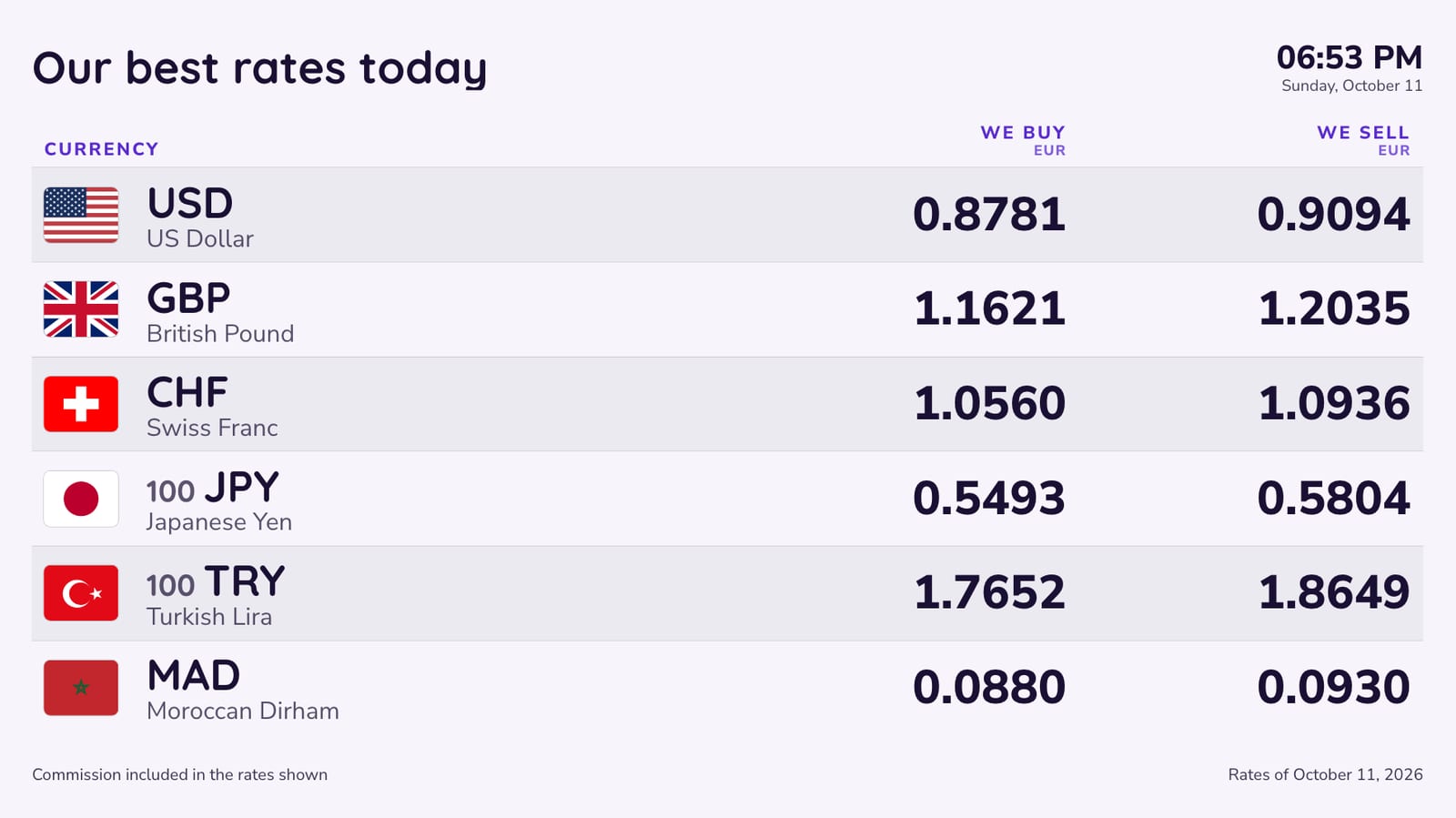
What the reception board shows
- The currencies your guests bring. Six or eight of the 60 Studio offers: the dollar, the pound, the Swiss franc, the yen, the yuan, whatever your guests carry. A board can show only some of the currencies in your rates table.
- We buy and We sell, side by side, from the hotel’s point of view.
- The unit next to the code, so the yen reads per 100, not as a row of zeros.
- Your logo, the date and the time, and the date of the rates.
- A commission line as large as the rates, if you charge one, and a footer line for your licence number.
The labels come in 14 languages. Pick a second language and the board switches between the two every six seconds, so a hotel with many Chinese or American guests can greet them in their own language. The currency names follow.
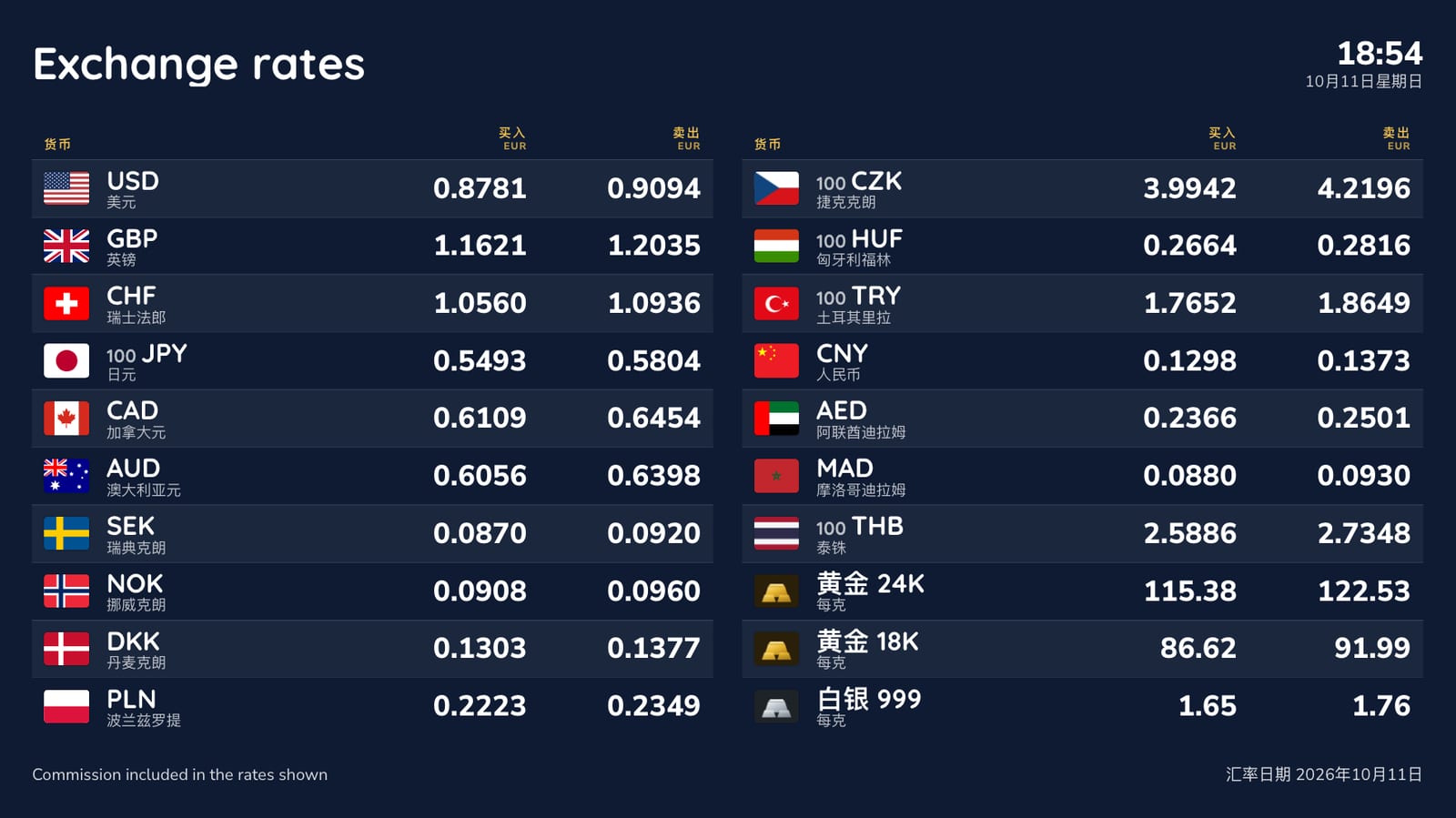
Rates that update themselves
Each currency is automatic or locked. An automatic currency starts from the reference rate that the European Central Bank and other central banks publish every working day, and applies your buy and sell margin. easyCMS checks for new rates every hour, so the board is right in the morning without anyone touching it. A locked currency keeps the rates you type until you change them, for hotels that agree their rates with a bank or a bureau.
Reception staff change rates on the Rates page in Studio, which works on a phone. Save, and the screen shows the new rates within a few minutes. If the internet drops, the screen keeps showing the last rates it received.
To try the sums for your own margins first, use the free exchange rate margin calculator.
Several hotels, one set of rates, or one each
A group runs every hotel from one easyCMS account. Each hotel can share one rates table, or have its own table with its own margins and currencies, and each screen picks the table it shows. A change made once reaches every reception that uses that table.
On the hotel website too
Switch on “On your website” and Studio gives you a link and a short piece of code. The page shows the same rates as the reception screen, in the language you choose, and updates by itself. It is the answer to the guest who emails before arriving to ask what rate you give.
What the rules ask of a hotel
A hotel that changes money as a regular service is usually covered by the same display rules as a bureau de change:
- France: the rules apply to anyone who changes money as a regular activity, hotels included. The rates and how the commission is calculated go on display, in characters of the same size; outside display is needed only when exchange is more than 5% of turnover, which a hotel rarely reaches. See what a bureau de change must display in France.
- Spain: a business that buys foreign banknotes from the public needs the Banco de España’s authorisation, and must display its minimum buy rates and commissions inside the premises. See what a currency exchange office must display in Spain.
- United Kingdom: any rate you show needs the matching sell rate (if you sell) and any commission, as prominently as the rate. See what a bureau de change must display in the UK.
This is not legal advice; check what applies to your hotel. The exchange rate display rules by country guide covers more countries.
What it costs
A reception screen is one display.
| Line | Cost |
|---|---|
| easyCMS account, up to 5 displays, includes 1 licence | 49 EUR one-time |
| Software total, paid once | 49 EUR |
The rates board, the automatic rates, the second language and the website table are included. If the screen does more than rates, it can: the same account runs your welcome screen, events and restaurant menus, as described on the digital signage for hotels page. The screen needs a player: an easyCMS Android player is 499€ and includes a licence, Windows player software is free, and LG webOS and Samsung Tizen screens run the player inside the panel.
What it will not do
- Live market rates. The automatic rates are daily reference rates. If you reprice during the day, lock your rates and type them.
- Connect to your property management system. Rates are set in Studio; nothing is posted to guest folios.
- Show buy rates only. Every board has a buy and a sell column, so a hotel that only buys foreign cash has a column it does not use.
- Replace your licence or your receipts. The board shows prices; the paperwork stays yours.
Ready-made designs for this: reception rates and the board for tourists, both on the exchange rate board templates page. For bureaux and exchange offices, see exchange rate board software.